For the best settings on an RTX 5060 or RTX 4060, play at 1080p, set textures one step below the maximum, turn on DLSS Super Resolution at Quality mode, and keep ray tracing off unless the game is light on it. Both cards have 8 GB of video memory, and in the worst problems TechSpot recorded, the memory ran out before the speed did.
That changes the order of the usual advice. Most guides start with DLSS. On these cards, start with textures, because a full memory buffer causes stutter that no upscaler fixes.
CoreLoadout has not benchmarked these cards. This is a verified-spec guide built from NVIDIA's pages and TechSpot's tests, with dates. We give no fps promises, because nobody can promise them without testing your game, your processor and your drivers.
Verified against: NVIDIA's RTX 5060 and RTX 4060 pages, NVIDIA's DLSS 4.5 Super Resolution page (14 January 2026), the NVIDIA app update of 31 March 2026, NVIDIA's 13 October 2026 frame generation beta post, and TechSpot's tests from May to September 2025. Last updated 20 October 2026.
This is part of our FPS guide. It builds on our DLSS settings guide and our frame generation guide.
The quick answer: what to set#
Use this as your starting point. Each row is explained in the steps below.
| Setting | What to set | Why |
|---|---|---|
| Resolution | 1080p. Use 1440p only with DLSS and lower textures | NVIDIA aims the RTX 5060 at 1080p and says 1440p frame rates will be lower |
| Texture quality | One step below the top preset | Both cards have 8 GB, and TechSpot saw stutter and missing textures at top presets |
| HD or 4K texture packs | Off | A 4K pack caused missing textures on both cards in Space Marine 2 |
| DLSS Super Resolution | On, Quality mode | Start here and step down only if you need more frames |
| DLSS model | Recommended, in the NVIDIA app | NVIDIA's own pick for each mode, with no extra cost stated for RTX 40 or 50 |
| Frame generation, RTX 4060 | On only if you already get about 60 fps | The card gets the 2x version. AMD's 60 fps rule is the only published figure we found |
| Multi Frame Generation, RTX 5060 | Lowest multiplier that reaches your screen's refresh rate | More frames than your screen shows are wasted |
| Ray tracing | Off, or the lowest setting | TechSpot called 8 GB insufficient for ray tracing in modern games |
What these two cards are#
Both cards have the same memory size on the same bus, so the texture advice is the same for both. The differences are speed and frame generation.
| Spec | RTX 5060 | RTX 4060 |
|---|---|---|
| CUDA cores | 3,840 | 3,072 |
| Memory | 8 GB GDDR7 | 8 GB GDDR6 |
| Memory bus | 128-bit | 128-bit |
| Total graphics power | 145 W | 115 W |
| Frame generation | Frame Generation and Multi Frame Generation | Frame Generation only |
Source: NVIDIA's product pages for each card.
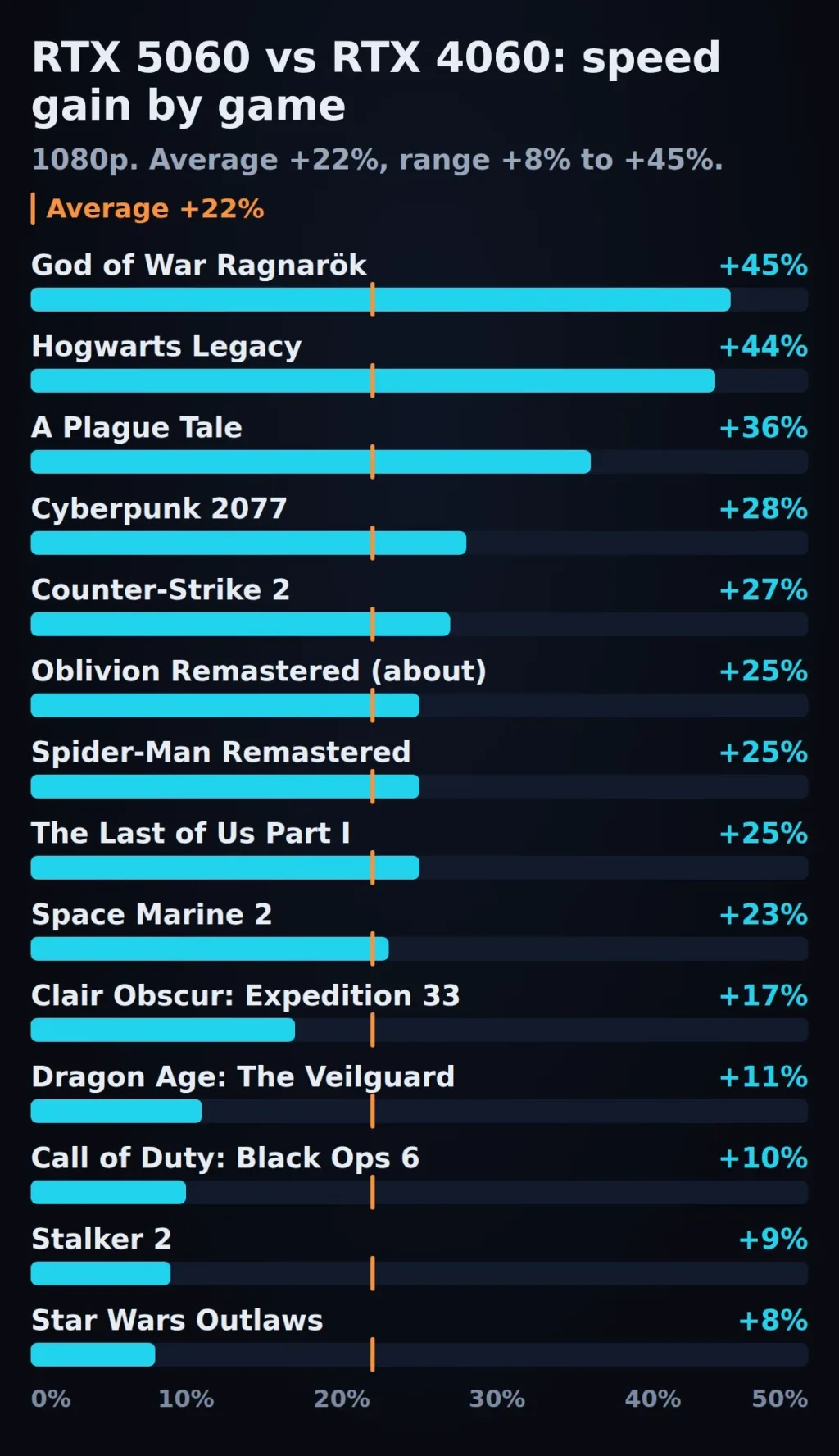
TechSpot measured the RTX 5060 22% faster than the RTX 4060 on average at 1080p, and 27% faster at 1440p, in May 2025. Do not expect 22% in every game. The gain ran from 8% in Star Wars Outlaws to 45% in God of War Ragnarök. That test used launch-era game builds and drivers, so treat it as a guide to the spread, not a current score.
Step 1: Pick 1080p or 1440p#
NVIDIA positions the RTX 5060 for high-frame-rate 1080p. Its own guide says you can play at 2560 × 1440, but that frame rates will be lower, and it gives no RTX 5060 figures at 1440p.
TechSpot's 1440p tests show where the trouble is. In May 2025 it measured Oblivion Remastered at a 34 fps average with 1% lows of 18 fps on the RTX 5060, and Stalker 2 at a 6 fps average. It listed both among the 8 GB problems. On the RTX 4060 the memory limit is the same.
So play at 1080p if you can. If you have a 1440p screen, you can still use it with DLSS (Step 3) and lower textures (Step 2), and be ready to drop to 1080p in the heaviest games.
Step 2: Set textures first#
Texture quality is the setting that most directly decides how much video memory a game uses. It is the first thing to change on an 8 GB card.
- Open the game's graphics menu and find Texture Quality. Some games call it Texture Resolution or Texture Detail.
- Move it one step below the highest. If the top option is Ultra, choose High.
- Turn off any optional HD or 4K texture pack.
- If the game shows a video memory meter, keep it under 8 GB.
- Play for ten minutes. If it runs smoothly, you can try one step up.
This is our rule of thumb, drawn from TechSpot's results below. It is not an NVIDIA setting.
Where 8 GB runs out#
These are the problems TechSpot recorded on the RTX 4060 and RTX 5060 in 2025.
| Game and setting | What TechSpot saw | Date |
|---|---|---|
| Clair Obscur: Expedition 33, Epic preset, higher resolution | The 8 GB card quickly ran out of memory and struggled | May 2025 |
| The Last of Us Part I, 1440p, ultra | Frame times were not consistent | May 2025 |
| Oblivion Remastered, 1440p | 34 fps average, 18 fps 1% low | May 2025 |
| Stalker 2, 1440p | 6 fps average | May 2025 |
| Horizon Zero Dawn Remastered, Very High | Both cards unplayable on frame times. The game needs more than 10 GB even at 1080p | July and Sept 2025 |
| Warhammer 40,000: Space Marine 2, Ultra with the 4K texture pack | Missing textures on both cards | July 2025 |
Sources: TechSpot's RTX 5060 review, its 60-class GPU comparison and its $300 GeForce versus Radeon comparison.
These are 2025 results on the game builds TechSpot tested. Patches since may have changed them, so use the table as a list of warning signs, not a current benchmark.
One more finding matters. TechSpot saw the RTX 5060 often do worse than the RTX 4060 once the memory was exceeded, and said it could not fully explain it. Being the faster card does not help when the memory is full.
Step 3: Turn on DLSS Super Resolution#
Open the game's graphics menu, find DLSS (sometimes called DLSS Super Resolution) and turn it on. Start at Quality.
The published render scales, which our FPS guide lists, are about 67% of your screen resolution for Quality, 58% for Balanced and 50% for Performance. By simple arithmetic, that means Quality renders at 720p on a 1080p screen and at 960p on a 1440p screen.
Move down one mode at a time only if you still miss your target. TechSpot's RTX 5060 results show why this card often needs upscaling. Alan Wake II ran at 36 fps at 1080p with DLSS Quality, and TechSpot called 1440p not viable there. Cyberpunk 2077 with its Ultra ray tracing preset came close to 60 fps at 1080p only with DLSS (both May 2025).
Step 4: Choose the model#
DLSS has several models. You can leave the choice to the NVIDIA app.
- Open the NVIDIA app and go to the Graphics tab.
- Choose the game, or Global Settings.
- Open DLSS Override - Model Preset and select Recommended.
NVIDIA says Recommended uses Preset M for Performance mode, Preset L for Ultra Performance, and Preset K for the other modes. NVIDIA warns that M and L cost more on RTX 20 and 30 cards. It makes no such statement for RTX 40 or 50, so Recommended is a reasonable choice on both of these cards.
Step 5: Add frame generation, if your card and frame rate allow it#
Frame generation adds extra frames between the real ones. It does not add video memory, and it does not fix a full memory buffer. Fix textures first. For the full explanation, see our frame generation guide.
RTX 4060#
The RTX 4060 gets Frame Generation, which adds one extra frame per real frame. It does not get Multi Frame Generation. NVIDIA also lists the newer Frame Generation model (Preset B) for RTX 40 and 50 cards, in the NVIDIA app under DLSS Override - Model Presets.
Turn it on only if you already get about 60 fps without it. That is AMD's published rule for its own frame generation. NVIDIA gives no number, and HotHardware found responsiveness held when the real frame rate stayed above roughly 40 fps. Judge by your 1% low, not your average.
RTX 5060#
The RTX 5060 gets Multi Frame Generation, up to four times the frames. Choose the lowest multiplier that reaches your screen's refresh rate. More generated frames than your screen can show give you nothing.
NVIDIA also lists Dynamic Multi Frame Generation and 6X mode for RTX 50 Series cards, but its page does not name the RTX 5060. Dynamic needs the NVIDIA app and driver 595.97 or newer, and 6X works only in select games. NVIDIA says Dynamic mode does not work with a frame rate limiter or V-Sync. Check the option is offered for your card before you plan around it.
Step 6: Keep ray tracing off, or low#
TechSpot said 8 GB is not enough for ray tracing in modern games, and in September 2025 said ray tracing on the RTX 4060 was so weak it barely mattered. The results do depend on the game:
- Spider-Man Remastered with ray tracing maxed: 112 fps at 1080p and 109 fps at 1440p on the RTX 5060.
- Dying Light 2 with ray tracing on high, upscaled: 72 fps at 1080p and 48 fps at 1440p.
- Alan Wake II with DLSS Quality: 36 fps at 1080p. TechSpot called 1440p not viable.
Turn ray tracing off first. If you want to try it, start with the lowest setting, change one effect at a time, and watch the memory.
Step 7: Check that it worked#
- Check DLSS is on. Press Alt+Z in the game, then go to Statistics, Statistics View, DLSS (NVIDIA's own check).
- Check video memory. Open Task Manager, go to Performance, click your GPU and look at Dedicated GPU memory while the game runs. If it sits near 8 GB and you see stutter, lower textures one more step.
- Judge the feel. Play the same scene for ten minutes. Stutter and missing textures mean memory. Low frames mean DLSS mode or ray tracing.
What is new right now#
- Frame generation Performance Mode (Preset C), beta. NVIDIA's 13 October 2026 post says it replaces the second AI model with a lighter one, for RTX 40 and 50 cards, with minor image-quality trade-offs. NVIDIA claims it is up to 35% faster on an RTX 5060 but gives no game, resolution or settings for that figure. It is an opt-in beta in the NVIDIA app.
- Dynamic Multi Frame Generation and 6X. Listed for RTX 50 Series since the NVIDIA app update of 31 March 2026.
- DLSS 4.5 Super Resolution. Released 14 January 2026 for all RTX cards through the NVIDIA app.
Troubleshooting#
The frame counter looks fine but the game stutters. This is the classic sign of a full memory buffer. Lower textures one step, turn off any HD pack, and check the memory graph in Task Manager.
Textures look blurry or pop in late. TechSpot saw missing textures on both cards at 1440p and with 4K packs. Lower textures or switch the pack off.
The RTX 5060 is slower than you expected next to a 4060. TechSpot saw this once memory was exceeded and could not fully explain it. Lower textures first.
Frame generation feels laggy. The real frame rate is probably too low. Raise it with DLSS or lower settings first. Our frame generation guide explains the 60 fps rule.
The Dynamic mode option is missing or turned off. NVIDIA says Dynamic does not work with a frame rate limiter or V-Sync, and needs driver 595.97 or newer.
The image smears after you turn on Preset C. NVIDIA says the mode has minor image-quality trade-offs. Go back to the default preset for that game.
Frequently asked questions#
Is 8 GB enough for the RTX 5060 and RTX 4060 in 2026?
For many games at 1080p with textures one step below the top, yes. Some games need more even at 1080p: TechSpot found Horizon Zero Dawn Remastered at Very High needs more than 10 GB. TechSpot's verdict in 2025 was that 8 GB cards should not be recommended at their price, so if you already own one, set it up as above.
What resolution should I play on?
1080p. NVIDIA aims the RTX 5060 at high-frame-rate 1080p and says 1440p frame rates will be lower. You can play at 1440p with DLSS and lower textures, but TechSpot saw several 8 GB problems at 1440p.
Should I use DLSS Quality or Performance?
Start at Quality. It renders at about 67% of your screen resolution. Move to Balanced, then Performance, one step at a time, only if you still miss your frame rate target.
Should I turn on frame generation on an RTX 4060?
Only if you already get about 60 fps without it. The RTX 4060 gets the 2x version, not Multi Frame Generation. See our frame generation guide for the full rule.
Does the RTX 5060 get 6X and Dynamic Multi Frame Generation?
NVIDIA lists both for RTX 50 Series cards but does not name the RTX 5060 on its page. Dynamic needs driver 595.97 or newer and the NVIDIA app. 6X works only in select games. Check that the option appears for your card.
How much faster is the RTX 5060 than the RTX 4060?
TechSpot measured 22% faster on average at 1080p and 27% at 1440p in May 2025, with a spread from 8% to 45% by game. Both cards have 8 GB, so the same texture limits apply.
How do I see if I am running out of video memory?
Open Task Manager, go to Performance, click your GPU and watch Dedicated GPU memory while you play. If it sits near 8 GB and the game stutters, lower textures.
Conclusion#
The best settings for an RTX 5060 or RTX 4060 follow one idea: the memory is the limit, so protect it first. Play at 1080p, set textures one step below the top, leave HD packs off, then turn on DLSS Quality with the Recommended model. Add frame generation only if your frame rate is already around 60, and keep ray tracing off or low.
Then check it. Look at the memory graph while you play, not only at the frame counter. If you are still deciding which card to buy, TechSpot recommended against 8 GB cards at their prices in 2025, so see our best GPU under $300 and best GPU for 1440p around $500 guides, or go back to the FPS guide for the full order of steps.
Sources
- NVIDIA: GeForce RTX 5060 family
- NVIDIA: GeForce RTX 4060 and 4060 Ti
- NVIDIA: Ultimate guide to GeForce RTX 5060 and 5060 Ti
- NVIDIA: DLSS 4.5 Super Resolution available now (14 January 2026)
- NVIDIA: NVIDIA app update adds DLSS 4.5 Dynamic Multi Frame Generation (31 March 2026)
- NVIDIA: DLSS This Week: frame generation Performance Mode beta (13 October 2026)
- TechSpot: Nvidia GeForce RTX 5060 Review (22 May 2025)
- TechSpot: Six Years of GeForce RTX 60 Class GPUs Tested (11 July 2025)
- TechSpot: $300 GeForce vs. $300 Radeon GPU: Four Generations (28 September 2025)
- AMD GPUOpen: FSR Frame Generation
- HotHardware: DLSS 4.5 Dynamic Multi Frame Generation tested (31 March 2026)
Comments
No comments yet. Be the first.
Leave a comment
Loading comments...